
How to Push WordPress Staging to Live Without Overwriting Your Database
Making changes on a WordPress staging site is easy. Publishing only those changes without replacing newer production data is the hard part. Learn how SirSync lets you move the pages, products, media, and related content that changed while leaving unrelated production data alone.
Why Staging and Production Drift Apart
A staging site starts as a copy of production, but the two databases immediately begin changing independently. Your team may redesign pages on staging while the live site receives orders, form submissions, users, reviews, inventory changes, and content edits.
By deployment day, staging may contain the design changes you want while production contains newer data you cannot afford to replace.
Replace this placeholder with the suggested screenshot, diagram, or video.
What Can Be Lost in a Full Database Push?
WordPress stores much more than page copy in its database. Depending on the site, a full database replacement can affect WooCommerce orders, users, form submissions, comments, custom post types, ACF values, menus, taxonomies, SEO metadata, plugin settings, and page-builder data.
If you rebuilt the entire website, a full migration may make sense. If you changed three pages, replacing the entire database usually does not.
Replace this placeholder with the suggested screenshot, diagram, or video.
Four Ways to Move WordPress Changes to Production
1. Full site migration: Best for launches, host changes, or other situations where the goal is to replace the existing site with a complete copy.
2. Rebuild the changes manually: Safe for tiny edits, but slow and error-prone for complex pages.
3. WordPress export/import: WordPress includes built-in tools for exporting and importing pages and posts, but you may still need to move images, custom field data, and other related content separately.
4. SirSync push/pull: Move individual pages, posts, products, or other supported content items between connected WordPress sites. Related images are transferred and remapped to the destination site, along with supported custom field data and SEO metadata, without replacing the entire database.
Replace this placeholder with the suggested screenshot, diagram, or video.
How SirSync Push and Pull Works
SirSync connects two WordPress installations so you can move individual pages, posts, products, and other supported content items between them without migrating the entire database. Your staging and production sites can already exist and have different content. There is no initial site or database sync required.
Connect your sites. Install SirSync on your existing staging and production sites and connect them. You can start pushing and pulling content right away.
Choose what to move. Select the complete pages, posts, products, or other supported content items you want to push or pull.
Bring the related data with it. SirSync transfers and remaps related images and handles supported custom fields, SEO metadata, taxonomies, page builder data, and other relationships associated with the content item. If related content already exists on the destination site, SirSync can match it by slug instead of creating a duplicate. Once that relationship is established, SirSync remembers the connection between the two items, so their slugs can change later without breaking the mapping.
Leave everything else alone. Content and data outside of the items being pushed or pulled remain untouched on the destination site.
Replace this placeholder with the suggested screenshot, diagram, or video.
WordPress IDs Do Not Need to Match
A page may reference an image as attachment ID 829 on staging. After that image exists on production, its ID might be 1432. Blindly copying the original ID can point the page at the wrong file.
SirSync maps supported relationships to the appropriate destination objects so content can remain connected even when WordPress IDs differ between sites.
Replace this placeholder with the suggested screenshot, diagram, or video.
Can You Push Just One WordPress Page From Staging to Live?
Yes. If you spent two days rebuilding a page on staging, you should not need to migrate the entire website just to publish that page.
SirSync can push the complete page along with supported related images, custom fields, SEO metadata, taxonomies, page builder data, and other relationships. Existing production content outside of that page remains untouched.
Replace this placeholder with the suggested screenshot, diagram, or video.
Works With the WordPress Tools You Already Use
WordPress sites are rarely built with the standard editor alone. Pages and posts can depend on page builders, custom fields, ecommerce data, SEO metadata, custom post types, taxonomies, and media.
SirSync is built to understand these common WordPress content structures and the tools that create them.
WordPress Content: Push and pull pages, posts, custom post types, taxonomies, and media, including content built with Elementor, Gutenberg, and SiteOrigin Page Builder.
WooCommerce: Move products and product changes without replacing unrelated live orders, customers, or other production data.
Advanced Custom Fields: Sync ACF field data along with supported field groups, settings, and ACF custom post types.
SEO: Preserve supported SEO metadata from Yoast SEO and All in One SEO as content moves between sites.
SirSync is built to work with the WordPress site you already have, so you do not need to rebuild your content around a special deployment workflow.
Replace this placeholder with the suggested screenshot, diagram, or video.
Bi-Directional WordPress Content Sync
- Push moves content from the site you are currently working on to the connected site. For example, you can finish a page on staging and push it to production when it is ready to go live.
- Pull works in the opposite direction. If a page was updated on production, you can pull that version back into staging without having to recreate the changes.
Replace this placeholder with the suggested screenshot, diagram, or video.
Schedule WordPress Content Syncs
You don’t need to be online when it’s time to move content. SirSync lets you schedule pushes and pulls to run automatically at a specific date and time.
Queue multiple pages, posts, products, or other supported content items during normal working hours, then let SirSync move them when scheduled.
This makes it easier to coordinate launches, publish approved changes, or deploy during lower-traffic hours without someone needing to log in and start each sync manually.
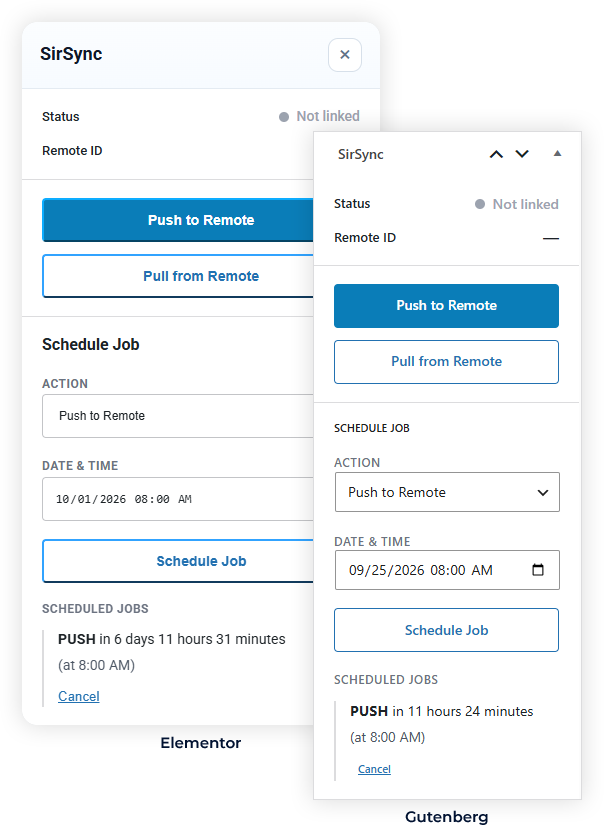
Selective Sync vs. Full Site Migration
Use a full migration when you are moving an entire WordPress installation, changing hosts, or launching a replacement site.
Use SirSync when both sites need to continue existing and you need to move individual pages, posts, products, or other supported content items between them.
The tools solve different problems. SirSync focuses on moving complete content items between connected WordPress environments without requiring a full-site or database migration.
Replace this placeholder with the suggested screenshot, diagram, or video.
Frequently Asked Questions
Can I move one WordPress page from staging to production?
Yes. SirSync lets you push an individual page from staging to production without replacing the entire WordPress database. Related images are transferred and remapped along with supported custom field data, SEO metadata, taxonomies, and page builder data.
Will pushing a page overwrite my WooCommerce orders?
No. Pushing a page does not replace your WooCommerce database. Orders, customers, and other unrelated production data are left untouched.
Can I push Elementor pages from staging to production?
Yes. SirSync includes native support for Elementor, along with Gutenberg and SiteOrigin Page Builder. Supported builder data and related media are handled when the complete page is pushed or pulled.
Can I move content in both directions?
Yes. You can push a page, post, product, or other supported content item to a connected site, or pull the complete item from the connected site into the current site.
Do WordPress IDs need to match between staging and production?
No. WordPress IDs often differ between installations. SirSync maps supported content and relationships between the two sites so references such as related media can point to the correct destination objects.
Do I need to set up SirSync before creating my staging site?
No. You can install SirSync on an existing staging and production site and start syncing pages right away. The sites do not need to have been previously connected or synchronized.
When you push content, SirSync uses existing content relationships, including matching related pages by slug, to map references to the correct content on the destination site. This means you can add SirSync to an existing WordPress workflow without rebuilding your staging environment or performing an initial full-site sync.
Move the Content. Leave the Database Alone.
You should not need to replace an entire production database because you changed a few pages on staging. Build and test on staging, then move what actually changed with SirSync.